Case Study:
A HubSpot Admissions Funnel Built for a Multi-Campus Preschool Network
At a Glance
A seven-campus Spanish-immersion preschool network needed one place to see every family from first inquiry to application. I rebuilt their HubSpot admissions funnel around a single idea: the child is the unit of enrollment, not the family.
| Client | Seven-campus Spanish-immersion preschool network, six campuses in one metro area and one in another state |
|---|---|
| HubSpot | Marketing Hub Professional, Sales Hub Enterprise |
| My scope | Inquiry through application: data model, pipelines, routing, workflows, sequences |
| Built | Inquiries pipeline, Enrollments pipeline, Child custom object, Familias records, per-child application links, campus routing, family nurture sequences, Closed Lost reasons |
| Handoff | Enrolled families move to the school's childcare management system once the deposit is paid |
The Challenge
The sales funnel lived in two systems, and neither one could tell leadership how many inquiries became enrolled families. HubSpot held the early conversations. The childcare management system held everything else, including families who hadn’t enrolled yet.
That second part caused real damage. Schools marked children as “enrolled” just to send a deposit invoice, so the enrolled count included families who hadn’t started and some who never would.
The HubSpot portal had its own problems:
- Each campus used it differently. One tracked every lead, one used it for bulk waitlist emails, one had mostly stopped.
- Several people had built in it over the years. There were four versions of “How did you hear about us?” and three different location properties.
- Nobody could answer the basic questions. What share of tours become applications? How long does a family sit in each stage? Which campus pipeline is healthy?
The goal was a funnel staff would actually use, with reporting leadership could trust.
Start with the unit of enrollment
Every decision after this one depended on answering a simple question first: what exactly is being enrolled? In childcare, it’s the child. Parents inquire, tour and pay, but each child has their own start date, schedule, age group and classroom.
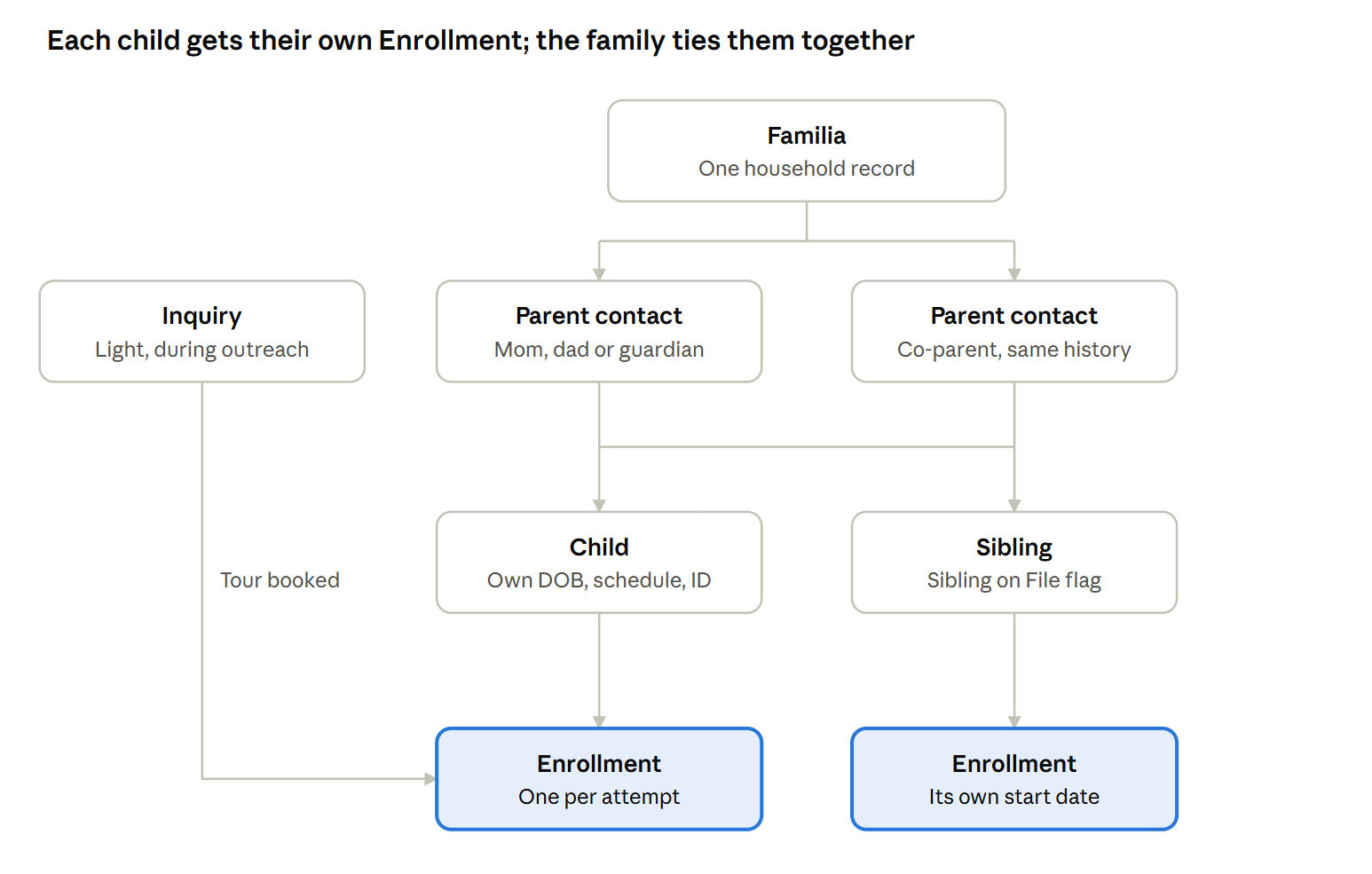
So each child’s enrollment journey became its own record:
- Parents are contacts. Mom, dad or a guardian each get their own record, so whoever answers the phone, the history stays in one place.
- Each child gets one Enrollment record per enrollment attempt. A second child is a new Enrollment. A family that leaves and comes back two years later is a new Enrollment too.
- Familias tie it together. One record per household shows every child, every enrollment and every conversation.
Two parents share every child, and each child carries their own Enrollment. An Inquiry only becomes an Enrollment once a tour is booked.
This handles the situations that break a family-based setup: two parents working with different staff, siblings enrolling years apart, and families who join the waitlist before their baby is born.
I also kept inquiries separate from enrollments. Not every form fill deserves a deal. An Inquiry stays light while staff reaStart with the unit of enrollmentch out, and the Enrollment is only created when a family books a tour. That keeps the enrollment pipeline honest: everything in it is a family who showed real intent.
When to use a custom object
I didn’t start out planning a Child custom object. My first instinct was to keep child details on the Enrollment record, because custom objects get over-engineered all the time. I’ve cleaned up that mistake for other clients.
I apply four questions before adding anything to a portal:
- Can something already in place do the job?
- How does this affect the other hubs and the other departments?
- Will it still make sense, and will people still understand why it exists, in five years?
- Why do we really need it?
Two things changed the answer.
First, the childcare management system needed key child data to originate in HubSpot: date of birth, schedule, siblings, enrollment status and tags. Building those fields on contacts or deals, then moving them to a custom object later, would have meant doing the work twice. Second, a child outlives any one enrollment. The same child can apply for summer, re-apply in the fall, or become the older sibling on a brother’s application.
So the Child object moved from a later phase to before launch. Here’s the test I use now:
| Use a custom object when… | Keep it on the deal when… |
|---|---|
| The thing has a life of its own, beyond any one deal | The data only matters for that one deal |
| It connects to many records over time | It belongs to one record and stays there |
| Another system needs it as its own record | Nothing downstream needs it on its own |
| Your HubSpot tier supports it | You'd need an upgrade just to hold a few fields |
A few details made it work on this portal’s tier:
- A unique child ID without Operations Hub. Campus code, date of birth and a guardian’s last name are joined with a standard workflow action. Twins and other multiples are handled with one question on the form.
- Siblings flagged, not assumed. A Sibling on File flag sits on both the Child and the Enrollment. It prompts a person to review, and it never applies a discount automatically.
- No domain matching. HubSpot’s usual habit of grouping by email domain doesn’t fit families. Parents use Gmail, not company domains, so siblings connect through the parent contact instead.
Fitting HubSpot to childcare
HubSpot is built for sales teams. Preschool directors are not salespeople, and they shouldn’t have to learn sales jargon to welcome a family. So the portal speaks their language.
Objects renamed for the people using them
| HubSpot default | What staff see | Why |
|---|---|---|
| Leads | Inquiries | A family asking a question isn't a "lead" to a preschool |
| Companies | Familias | Matches the school's bilingual voice and what the record really is |
| Deals | Enrollments | The thing being won is a child's spot |
| Custom object | Children | Each child's own record |
Even the pipeline names got this treatment. The inquiry pipeline is called Discovery, not Admissions. In childcare, “admissions” means the formal paperwork. Families in that pipeline are still exploring.
One build that serves seven campuses
The easy route was seven copies of every email and sequence, one per campus. That’s seven places to update every time a word changes. Instead:
- The interest form sets the campus, and a routing workflow fills in that campus’s tour booking link and street address.
- One follow-up sequence uses those two personalization tokens, so every family gets their own campus’s details.
- Each campus has its own round-robin tour calendar in HubSpot Meetings. I chose Meetings over the third-party scheduler the school had used, because that tool skipped ownership and property updates for existing contacts, and every family booking a tour already exists in the CRM.
- A new campus means a new dropdown value and a calendar, not a new set of assets.
Built for how families really apply
- Each child gets their own application link carrying their Child ID, so a submission lands on the right child even when parents apply for two at once.
- One application per child, with a link on the thank-you page to apply for a sibling.
- Families ready to apply can skip the tour step from the interest form.
- A campus filter lets the school pilot at one location and add the others when ready.
Lost reasons that can be reported on
When an Enrollment closes lost, staff must pick one of seven reasons: price, availability or timing, chose another provider, program fit, family circumstances changed, low intent, or lost in process. An optional notes field holds the details. A required dropdown is what makes the lost-reason report worth looking at.
Even the pipeline names got this treatment. The inquiry pipeline is called Discovery, not Admissions. In childcare, “admissions” means the formal paperwork. Families in that pipeline are still exploring.
One build that serves seven campuses
The easy route was seven copies of every email and sequence, one per campus. That’s seven places to update every time a word changes. Instead:
- The interest form sets the campus, and a routing workflow fills in that campus’s tour booking link and street address.
- One follow-up sequence uses those two personalization tokens, so every family gets their own campus’s details.
- Each campus has its own round-robin tour calendar in HubSpot Meetings. I chose Meetings over the third-party scheduler the school had used, because that tool skipped ownership and property updates for existing contacts, and every family booking a tour already exists in the CRM.
- A new campus means a new dropdown value and a calendar, not a new set of assets.
Built for how families really apply
- Each child gets their own application link carrying their Child ID, so a submission lands on the right child even when parents apply for two at once.
- One application per child, with a link on the thank-you page to apply for a sibling.
- Families ready to apply can skip the tour step from the interest form.
- A campus filter lets the school pilot at one location and add the others when ready.
Lost reasons that can be reported on
When an Enrollment closes lost, staff must pick one of seven reasons: price, availability or timing, chose another provider, program fit, family circumstances changed, low intent, or lost in process. An optional notes field holds the details. A required dropdown is what makes the lost-reason report worth looking at.
Small touches that make it easy for staff
A CRM nobody opens is just an expensive spreadsheet. The details that get staff to use it every day are usually small.
- Campus color coding. Each campus has its own color on Enrollments and contacts. A director can scan the board and spot their families at a glance.
- Saved views by contact type. Contacts are tagged Prospective Familia, Familia, Staff, Candidate or Vendor, with a saved view for each. Staff open the list they need instead of building filters.
- Names that explain themselves. Every form, email, sequence and workflow follows one pattern, such as
INQUIRY | New Inquiry Series. The prefix tells you which stage of the family’s journey it belongs to. - Descriptions on every workflow. Each one says what starts it and what it changes. The next person to work in the portal doesn’t have to reverse-engineer it.
- One property, not four. Duplicate fields were merged into one, so reports pull from a single source.
- Tasks go to the right person. The admissions lead owns a family until an offer is made. Campus directors aren’t pulled into follow-up before then.
- Staff own their words. The admissions team edits email templates directly, without waiting on a consultant to change a sentence.
Protecting the parent experience
Parents choosing a preschool are handing over their baby. Every bit of friction, whether it’s a confusing form or a slow reply about a tour, costs trust. The automation is there to make the school feel more personal, not less.
- Follow-up that sounds like a person. The first emails after an inquiry come from the admissions lead’s own inbox, in her voice, signed “Con calidez” (warmly). The third email addresses the most common worry directly: “We don’t speak Spanish at home.”
- Booking a tour in a few clicks. Families get their own campus’s booking link, so there’s no back-and-forth to find a time.
- A kind no-show path. A missed tour sends a sorry-we-missed-you email and a task to reach out, not silence.
- No asking twice. Returning visitors find the application already filled in with what the school knows.
What the client said
“She knows HubSpot deeply. Early on she steered us away from architecture choices that would have caused reporting problems, and she flagged several risks before we did.”
“When we raised issues with how our legacy workflows were interacting with the new build, she diagnosed the cause and fixed it.”
The school’s leadership also called the new workflows far cleaner than what they had before.
Takeaways for multi-location businesses
- Decide what you’re actually selling first. Here, it was a child’s spot. Get that right and the rest of the build follows.
- Use a custom object only when the thing has a life of its own. If it outlives a single deal, connects to many records, or another system needs it, give it its own record. If not, keep it on the deal.
- Speak your staff’s language. Renaming objects and pipelines costs nothing and makes a CRM far easier to adopt.
- Build once for every location. Tokens and routing beat seven copies of every email.
- Roll out one location at a time. A pilot at one campus catches problems before they reach every school.
- Sign off on the details, not just the flow. When several people make the decisions, I now walk them through the field-level choices, like triggers, dropdown values and the data model, and get written sign-off before building.

WHAT WAS BUILT
✦ Child-centered enrollment architecture (Inquiry → Tour → Application → Waitlist → Offer → Enrolled)
✦ Child custom object with a unique ID built without Operations Hub
✦ Familias household records linking parents and siblings
✦ Separate Inquiries and Enrollments pipelines, with Enrollments created when a tour is booked
✦ Per-child application links matched to the right record
✦ Campus routing, round-robin tour calendars and personalization tokens
✦ Family nurture and missed-tour sequences
✦ Required Closed Lost reasons for reporting
✦ Campus color coding and saved views by contact type
KEY SKILLS
Enrollment Data Architecture
Custom Object Design
Multi-Location CRM Setup
Workflow Automation
Nurture Sequence Strategy
CRM Adoption & Usability
Questions about this case
Can HubSpot work as an enrollment CRM for a preschool or childcare center?
Yes. HubSpot handles the admissions side well: inquiries, tours, applications and waitlists. Your childcare management software keeps billing, attendance and enrolled-student records.
When should you use a custom object instead of deal properties?
Use one when the thing has a life beyond any single deal, connects to many records over time, or another system needs it as its own record. If the data only matters for one deal, keep it on the deal. Custom objects require an Enterprise tier.
How do you handle siblings and families with more than one child?
Each child gets their own record and their own Enrollment, and both parents connect to every child. A Sibling on File flag prompts staff to review the family. Discounts are never applied automatically.
Can one HubSpot setup serve several locations?
Yes. Campus routing and personalization tokens let one set of emails and sequences serve every location. Adding a campus means adding a dropdown value and a tour calendar, not a new set of assets.
Do you need Data (Operations) Hub for a build like this?
No. The unique child ID is built by joining standard fields with a native workflow action, so it works without Operations Hub.