
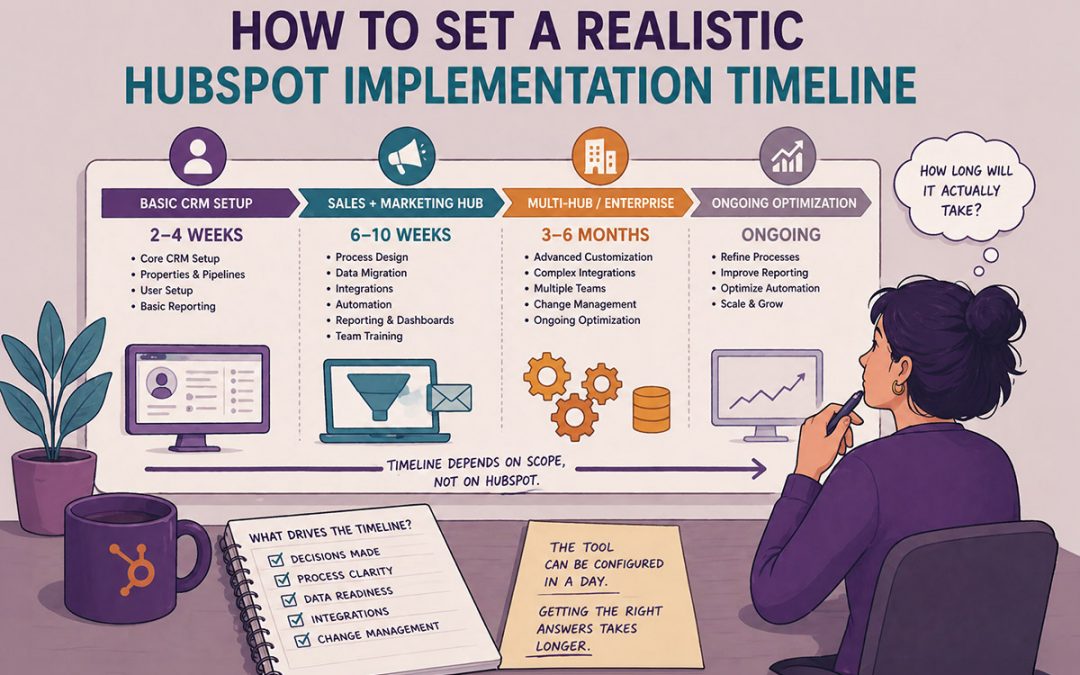
How Long Does HubSpot Setup Actually Take?
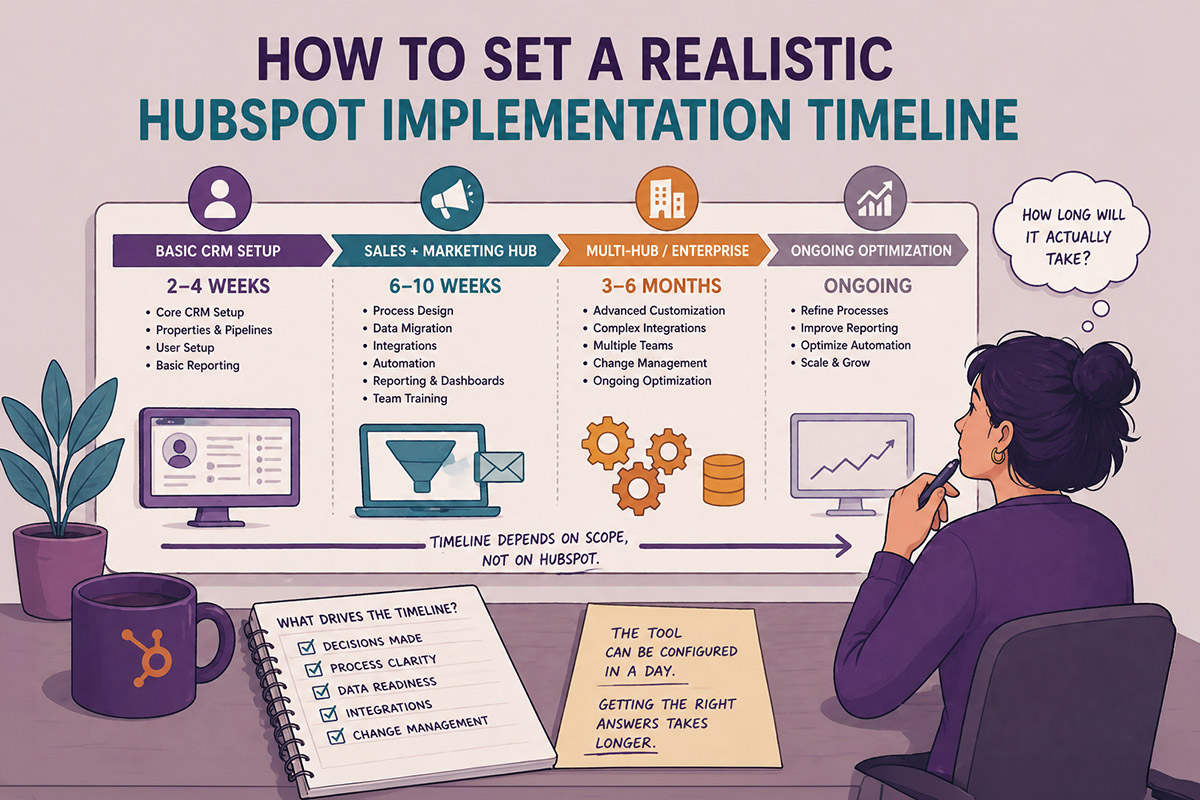
Decisions drive the HubSpot Set Up Timeline
How long does HubSpot setup take?
A basic HubSpot CRM setup with a consultant typically takes 2–4 weeks. A full Sales + Marketing Hub implementation runs 6–10 weeks, depending on data migration, integrations, and how much of your existing process needs to be rebuilt. Enterprise-level or multi-hub implementations can take 3–6 months. The timeline depends almost entirely on scope — not on HubSpot.
The most common reason HubSpot takes longer than expected isn’t the tool. It’s the decisions that haven’t been made yet.
What lifecycle stages will you use? How will you define a qualified lead? What does your sales process actually look like — not the one in the deck, the one your reps actually follow? HubSpot can be configured in a day. Getting those answers takes longer.
Here’s an honest breakdown of what setup actually involves — and what makes it go faster or slower.
HubSpot Setup Timelines by Scope
Basic CRM Setup: 1–2 weeks
This covers connecting your email, importing contacts, setting up deal stages, and getting your team logging activity in one place. If you’re coming from a spreadsheet or a basic tool like Streak or Pipedrive, this is usually the scope.
What’s included:
- Contact and company import and deduplication
- Deal pipeline and stage setup
- Email and calendar integration
- User setup and basic permissions
- Team training on daily use
Sales + Marketing Hub Implementation: 4–8 weeks
This is the most common scope for growing B2B businesses.
You’re not just tracking deals — you’re building the infrastructure for lead generation, nurturing, and reporting. The extra time is almost always tied to decisions about lifecycle stages, lead scoring, and what automations you actually need.
What’s included (in addition to the above):
- Lifecycle stage mapping and workflow automation
- Lead capture forms and landing pages
- Email marketing setup and list segmentation
- Reporting dashboards for sales and marketing
- CRM property cleanup and data governance rules
Full Multi-Hub or Migration Implementation: 8–16 weeks
If you’re migrating from Salesforce, a legacy CRM, or a heavily customized system — or adding Service Hub, Operations Hub, or complex integrations — plan for 2–4 months minimum. The technical work is manageable. The data cleanup and process alignment are what take time.
What adds time here:
- Data migration and field mapping from the old system
- Custom object setup
- Third-party integrations (ERP, billing, support tools)
- Multi-team onboarding and role-based training
- Custom reporting and advanced automation builds
What Makes Setup Go Faster
The businesses that move fastest through HubSpot setup have one thing in common: they’ve made their process decisions before the configuration starts.
- You know your lifecycle stages — and they reflect how contacts actually move through your funnel, not how you wish they did.
You have a clear definition of a qualified lead that sales and marketing agree on. - Your data is reasonably clean before it’s imported — or you’ve budgeted time for cleanup.
- You have one person on your team who owns HubSpot decisions and can move quickly.
If those things aren’t in place, the setup doesn’t fail — it just takes longer while everyone figures them out.
What Makes Setup Take Longer
- Scope creep. “While we’re in here, can we also…” is the most common delay in any implementation.
- Dirty data. A contact list that hasn’t been cleaned in three years takes time to sort out before it can be imported properly.
- Slow decisions. HubSpot can’t be configured around a process that hasn’t been defined yet.
- Multiple stakeholders with conflicting requirements. Sales wants one thing. Marketing wants another. Getting alignment takes time — but skipping it creates a system nobody uses.
Does It Matter Whether You Use HubSpot’s Own Onboarding?
HubSpot requires paid onboarding for most hub tiers — but that onboarding can be fulfilled by a certified HubSpot Solutions Partner instead of HubSpot directly. The timeline is similar. The difference is in how the work is done.
HubSpot’s own onboarding is structured around their process. A Solutions Partner consultant configures HubSpot around your process — which typically means less rework later and a system that actually reflects how your team sells and markets.
If you’re evaluating options, that distinction is worth understanding before you commit.
The Bottom Line
HubSpot setup isn’t slow. Indecision is slow. Dirty data is slow. Trying to build automations around a sales process that hasn’t been clearly defined is slow.
If you come in with clear answers to the foundational questions — how your funnel works, what a qualified lead looks like, who owns what — setup moves quickly. If those decisions still need to be made, build extra time into your timeline. It’s not a flaw in the tool. It’s just the work.
Want to know how long your specific setup would take? Let’s talk.
How long does HubSpot CRM setup take for a small business?
For a small business starting with the free CRM or Starter tier, basic setup — importing contacts, connecting email, and setting up a pipeline — typically takes 1–2 weeks with a consultant. If you’re doing it yourself without prior HubSpot experience, budget 3–4 weeks.
How long does HubSpot Marketing Hub setup take?
Marketing Hub setup — including forms, landing pages, email campaigns, workflows, and reporting — typically takes 4–6 weeks when done by a consultant who knows your business. If you’re building out from scratch and still defining your process, 6–8 weeks is more realistic.
Can I set up HubSpot myself without a consultant?
Yes — HubSpot is designed to be user-friendly and their knowledge base is extensive. That said, most businesses that set it up themselves end up with a system that works on the surface but has structural problems underneath: lifecycle stages that don’t actually automate, reports that don’t tell the full story, workflows that conflict with each other. A consultant typically saves more time than they add.
How long does it take to migrate from Salesforce to HubSpot?
A Salesforce to HubSpot migration typically takes 8–16 weeks depending on data complexity, custom object requirements, and how much cleanup the existing data needs. The migration itself is technical but manageable. The data quality work — deduplication, field mapping, historical record decisions — is usually what extends the timeline.
What's the difference between HubSpot onboarding and HubSpot setup?
HubSpot onboarding typically refers to the required onboarding package HubSpot sells with paid hubs — it’s a guided process to get your portal configured and your team trained. HubSpot setup is a broader term that covers everything involved in getting the platform working for your business, including data migration, custom configuration, integrations, and process design. Onboarding is one part of setup.
Does using a HubSpot Solutions Partner speed up setup?
Generally yes — a Solutions Partner has done this before, knows where the common delays are, and can fulfill HubSpot’s required onboarding at the same time. The bigger advantage isn’t speed, though. It’s configuration quality. A portal built around your actual process needs less rework six months later.