How to Turn “No” Into “Not Now” in HubSpot
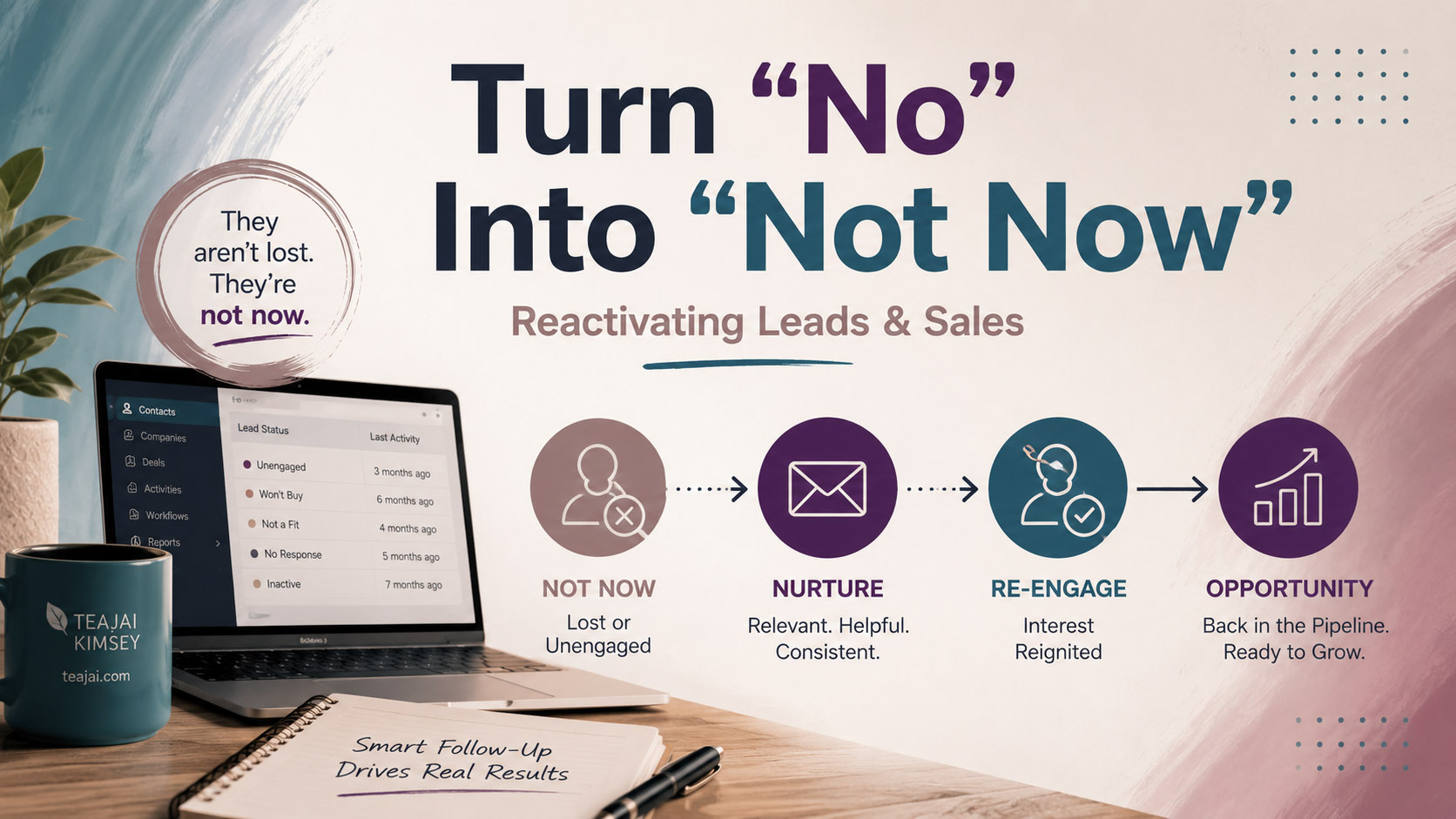
Most sales teams think in two buckets:
Won or Lost
And while that makes pipeline reporting cleaner, it doesn’t reflect how sales conversations actually work.
“Lost” is rarely the whole truth. More often, it means not this quarter, not with this budget, not until the contract expires, not until we hire someone, or not until leadership signs off. The difference matters — because if your CRM treats “not yet” the same as “never,” you’re quietly losing revenue you already worked to earn.
Let me walk through what this actually looks like in practice.
Scenario 1: The Budget Wall
You’ve been working a deal for three weeks. You ran the demo, customized the proposal, answered the security questionnaire, looped in their ops manager. The champion is enthusiastic. Then you get the email: “We love this. Unfortunately, our 2026 budget is already allocated. Let’s revisit next quarter.”
The rep did everything right. But they go into HubSpot, select Closed Lost → Budget, and that’s where the deal dies. It sinks to the bottom of the pipeline, drops off the forecast, and stops coming up in conversation.
Three months later, the prospect reallocates funds — and signs with a competitor who followed up first.
The objection was never about value. It was about timing. If that Closed Lost reason had triggered a required follow-up date — with a workflow that created a task 90 days out, reopened the deal, and notified the owner — that rep would have walked back into the conversation at exactly the right moment.
Scenario 2: “We’re Under Contract”
You’re on a discovery call. Everything lines up: right ICP, clear pain, strong ROI case. Then they tell you they just renewed with a competitor through December. You know you can win this deal. Just not today.
The rep marks Closed Lost → Existing Vendor and moves on. And here’s where it gets dangerous. Without a structured follow-up date tied to renewal timing, this becomes a guessing game. Did the rep remember the month? Did they write it down somewhere? Did they move companies before the renewal came around? Did anyone else pick it up?
Now imagine that when “Existing Vendor” is selected, HubSpot requires a renewal date. A workflow calculates a reactivation date 60 days before that renewal, creates a task, moves the deal into a visible active stage, and optionally enrolls the contact in a light-touch nurture sequence.
You’re not hoping someone remembers. You’re strategically positioned for renewal season. That’s how competitive deals get won.
Scenario 3: “Too Early”
This one comes up constantly with inbound leads. There’s real interest, but when you get on the call, you discover they’re pre-revenue, haven’t hired the right people yet, or are still just exploring the idea. The rep marks Disqualified → Too Early.
But “too early” is not the same as unqualified. It just means the timing isn’t there yet. Six months later, they raise funding, bring on a VP of Sales, and start actively evaluating platforms — and your CRM still has them marked as dead.
A simple fix: when “Too Early” is selected, prompt for a follow-up date. Pause the lifecycle stage. Trigger a reactivation workflow a week before that date. Assign a task to the original owner and move the record into a pre-qualification stage so it doesn’t disappear from view.
Now the rep re-enters the conversation when the growth actually happens — not because they remembered to check, but because the system reminded them. If you’re not sure how your lifecycle stages map to sales-ready criteria, this post on spotting gaps in your HubSpot lifecycle is worth a read before you build the logic.
Scenario 4: Internal Chaos
This one doesn’t show up cleanly in a dropdown. You’re mid-deal when the champion leaves the company, or a restructure delays budget approval, or the executive sponsor pulls back. The rep feels it slipping. Eventually, they close it out with something vague: Closed Lost → No Decision.
What really happened is that the company went into pause mode. And pause mode doesn’t mean a permanent no. If that reason had opened a follow-up date — even 120 days out — the deal wouldn’t quietly die in the pipeline graveyard. It would be scheduled for re-entry when things stabilize.
What Reps Are Actually Dealing With
Sales reps are juggling 40+ active leads, 10–20 open deals, demos, follow-ups, admin work, Slack messages, and forecast updates at the same time. Expecting them to mentally track who to circle back with in three to six months just isn’t realistic. Memory is not a strategy. Automation is.
The Operational Fix
The setup is simpler than it sounds. You need two things.
First, add conditional logic to your disqualified reason field (for leads) and your closed lost reason field (for deals). Certain selections should require a follow-up date before the record can be saved — no date, no close.
Second, build a reactivation workflow. When the follow-up date equals today: move the lifecycle stage back to MQL or SQL, reopen or recreate the deal, create a task for the owner, and optionally notify leadership. That’s the whole thing. A CRM that holds your team accountable doesn’t require complex logic — it just requires intentional setup.
What This Builds Over Time
After a few months of running this structure, something shifts. A steady stream of warm opportunities starts re-entering the pipeline on a predictable schedule. Reps spend more time in warm conversations and less time cold prospecting. Win rates improve because they’re showing up at the right time — not just the first available time.
You’re creating a second-wave pipeline without spending another dollar on acquisition. If you want to see how this plays out in the numbers, tracking what actually happens in your sales pipeline will show you exactly where those reactivated deals are coming from.
The Real Insight
Closed Lost is not a graveyard. It’s a waiting room.
When your CRM reflects that reality, you recover pipeline, protect marketing spend, improve forecast accuracy, and build a predictable reactivation motion that runs in the background without anyone having to think about it. I originally built this at the suggestion of a client, but I’ve seen it work across almost every B2B sales team using HubSpot.
Because in sales, “no” is rarely permanent. It’s just not yet. And designing your CRM to account for that is one of the highest-leverage things you can do.
Most sales teams think in two buckets:
Won or Lost
And while that makes pipeline reporting cleaner, it doesn’t reflect how sales conversations actually work.
“Lost” is rarely the whole truth. More often, it means not this quarter, not with this budget, not until the contract expires, not until we hire someone, or not until leadership signs off. The difference matters — because if your CRM treats “not yet” the same as “never,” you’re quietly losing revenue you already worked to earn.
Let me walk through what this actually looks like in practice.
Scenario 1: The Budget Wall
You’ve been working a deal for three weeks. You ran the demo, customized the proposal, answered the security questionnaire, looped in their ops manager. The champion is enthusiastic. Then you get the email: “We love this. Unfortunately, our 2026 budget is already allocated. Let’s revisit next quarter.”
The rep did everything right. But they go into HubSpot, select Closed Lost → Budget, and that’s where the deal dies. It sinks to the bottom of the pipeline, drops off the forecast, and stops coming up in conversation.
Three months later, the prospect reallocates funds — and signs with a competitor who followed up first.
The objection was never about value. It was about timing. If that Closed Lost reason had triggered a required follow-up date — with a workflow that created a task 90 days out, reopened the deal, and notified the owner — that rep would have walked back into the conversation at exactly the right moment.
Scenario 2: “We’re Under Contract”
You’re on a discovery call. Everything lines up: right ICP, clear pain, strong ROI case. Then they tell you they just renewed with a competitor through December. You know you can win this deal. Just not today.
The rep marks Closed Lost → Existing Vendor and moves on. And here’s where it gets dangerous. Without a structured follow-up date tied to renewal timing, this becomes a guessing game. Did the rep remember the month? Did they write it down somewhere? Did they move companies before the renewal came around? Did anyone else pick it up?
Now imagine that when “Existing Vendor” is selected, HubSpot requires a renewal date. A workflow calculates a reactivation date 60 days before that renewal, creates a task, moves the deal into a visible active stage, and optionally enrolls the contact in a light-touch nurture sequence.
You’re not hoping someone remembers. You’re strategically positioned for renewal season. That’s how competitive deals get won.
Scenario 3: “Too Early”
This one comes up constantly with inbound leads. There’s real interest, but when you get on the call, you discover they’re pre-revenue, haven’t hired the right people yet, or are still just exploring the idea. The rep marks Disqualified → Too Early.
But “too early” is not the same as unqualified. It just means the timing isn’t there yet. Six months later, they raise funding, bring on a VP of Sales, and start actively evaluating platforms — and your CRM still has them marked as dead.
A simple fix: when “Too Early” is selected, prompt for a follow-up date. Pause the lifecycle stage. Trigger a reactivation workflow a week before that date. Assign a task to the original owner and move the record into a pre-qualification stage so it doesn’t disappear from view.
Now the rep re-enters the conversation when the growth actually happens — not because they remembered to check, but because the system reminded them. If you’re not sure how your lifecycle stages map to sales-ready criteria, this post on spotting gaps in your HubSpot lifecycle is worth a read before you build the logic.
Scenario 4: Internal Chaos
This one doesn’t show up cleanly in a dropdown. You’re mid-deal when the champion leaves the company, or a restructure delays budget approval, or the executive sponsor pulls back. The rep feels it slipping. Eventually, they close it out with something vague: Closed Lost → No Decision.
What really happened is that the company went into pause mode. And pause mode doesn’t mean a permanent no. If that reason had opened a follow-up date — even 120 days out — the deal wouldn’t quietly die in the pipeline graveyard. It would be scheduled for re-entry when things stabilize.
What Reps Are Actually Dealing With
Sales reps are juggling 40+ active leads, 10–20 open deals, demos, follow-ups, admin work, Slack messages, and forecast updates at the same time. Expecting them to mentally track who to circle back with in three to six months just isn’t realistic. Memory is not a strategy. Automation is.
The Operational Fix
The setup is simpler than it sounds. You need two things.
First, add conditional logic to your disqualified reason field (for leads) and your closed lost reason field (for deals). Certain selections should require a follow-up date before the record can be saved — no date, no close.
Second, build a reactivation workflow. When the follow-up date equals today: move the lifecycle stage back to MQL or SQL, reopen or recreate the deal, create a task for the owner, and optionally notify leadership. That’s the whole thing. A CRM that holds your team accountable doesn’t require complex logic — it just requires intentional setup.
What This Builds Over Time
After a few months of running this structure, something shifts. A steady stream of warm opportunities starts re-entering the pipeline on a predictable schedule. Reps spend more time in warm conversations and less time cold prospecting. Win rates improve because they’re showing up at the right time — not just the first available time.
You’re creating a second-wave pipeline without spending another dollar on acquisition. If you want to see how this plays out in the numbers, tracking what actually happens in your sales pipeline will show you exactly where those reactivated deals are coming from.
The Real Insight
Closed Lost is not a graveyard. It’s a waiting room.
When your CRM reflects that reality, you recover pipeline, protect marketing spend, improve forecast accuracy, and build a predictable reactivation motion that runs in the background without anyone having to think about it. I originally built this at the suggestion of a client, but I’ve seen it work across almost every B2B sales team using HubSpot.
Because in sales, “no” is rarely permanent. It’s just not yet. And designing your CRM to account for that is one of the highest-leverage things you can do.