
You’ve Been Asked to “Launch a Campaign”… So You Sent an Email
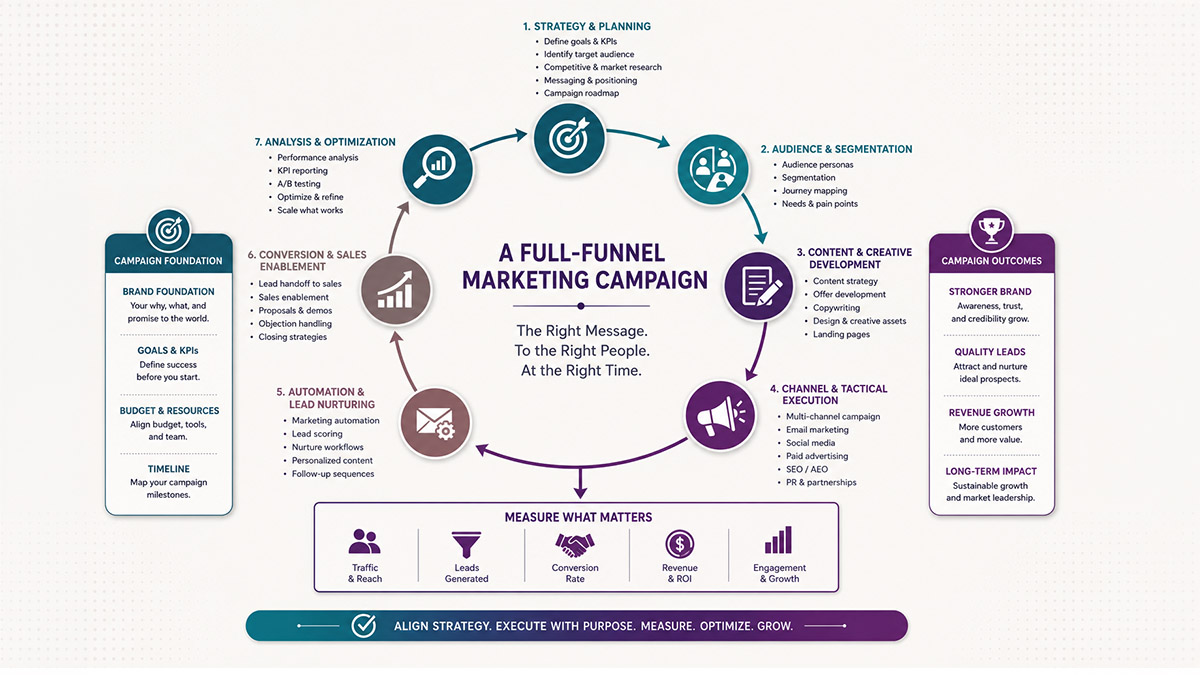
When in doubt, name your campaign after the goal and period — not the tactic
You’ve Been Asked to “Launch a Campaign”… So You Sent an Email
That scenario is more common than you’d think. Someone asks you to run a campaign. First thought: draft an email and hit send.
Weeks later, you’re stuck trying to explain why reporting is fragmented, goals aren’t tracked properly, and leadership can’t tie any activity to results.
That’s because a campaign is not a single email. Not a single SMS. Not one ad.
A campaign is a strategic container — and when you treat it like a single tactic, everything that depends on structure and clarity falls apart.
What Is a Marketing Campaign (Really)?
A proper marketing campaign is a coordinated set of actions designed to achieve a specific goal, within a defined timeframe, targeting a specific audience, executed across multiple channels.
Read that again. A set of actions. Plural.
A campaign isn’t:
- A single email
- A landing page alone
- A print asset
- A social post
Those are tactics — pieces of the bigger plan.
Campaign vs. Tactic: The Clearest Way to Think About It
Here’s a simple way to understand it:
| Term | What It Means |
|---|---|
| Campaign | The strategic container — with a goal, a timeline, and an audience |
| Tactic | A specific action used to support the campaign |
| Channel | Where the tactic lives (email, paid ads, SMS, social, print) |
| Asset | The tangible thing (landing page, email, PDF, ad creative, form) |
So a campaign might include paid ads, landing pages, email sequences, organic social, print collateral, and event follow-up — but none of those alone is the campaign.
A Real-World Example
I work with a home builder whose entire go-to-market strategy runs through relationships with real estate agents. Their realtors bring them buyers — that’s the model.
All year long, they’re sending marketing emails, SMS messages, and doing regular outreach to their realtor network. The goal? Build enough trust and top-of-mind presence that when a realtor has a buyer, they think of this builder first.
Now layer in builder introduction webinars where registrations come from realtor referrals, and loan officers.
- Invitation emails
- Registration forms
- Segmentation lists
- SMS reminders
- Post event follow ups
- On-going nurturing emails
This is one campaign. Not four separate ones.
That’s one campaign for that event — not five separate ones. Each tactic is an asset inside the event campaign. And that event campaign is a sub-effort that lives within the larger annual strategy.
When I sat down with this client and pulled up their HubSpot, here’s what we actually found: individual “campaigns” for every email send. Dozens of one-offs with no connective tissue. Attribution was all over the place. Nobody could answer: “What’s working?”
We started grouping those tactics under proper campaign structures. And here’s the interesting part — HubSpot can backfill some of that attribution. Group the old emails and assets correctly, and you might discover where leads actually came from. You might find that one lunch-and-learn event quietly closed deals you never knew to credit.
That’s what a campaign structure gives you. Not just cleaner reporting — smarter decisions.
What Goes Inside a Campaign
When you build a campaign in HubSpot, you’re pulling together assets — the individual pieces that support the overall goal. These can include:
- Emails (marketing emails and sequences)
- SMS messages
- Landing pages and forms
- Paid ads
- Workflows and automations
- Segmented contact lists
- Social posts
- Print collateral and event materials
Every one of these becomes a piece of data that reports back to the campaign. Open rates, form submissions, page conversions, deal influence — all of it rolls up to the campaign goal. But only if you’ve set it up that way from the start.
Why This Matters for Reporting
Too many marketers create a separate campaign for each individual tactic. The result:
- Attribution is fragmented across dozens of “campaigns”
- ROI is impossible to prove
- You can’t compare channels because they aren’t in the same container
- Leadership can’t see the big picture.
When you unify tactics under one strategic campaign, you can:
- Compare channels side by side
- Report on both overall performance and tactic-level performance
- Tie marketing activity directly to business outcomes
- Answer the question leadership always asks: “What’s driving results?”
You can still break out the individual metrics. Email open rates. Landing page conversions. Ad ROI. You just do it within the campaign framework — which gives every metric context.
A Note on HubSpot Campaigns Specifically
HubSpot’s campaign tool is designed exactly for this. One campaign. Multiple assets attached. Unified reporting.
The problem I see most often? Teams create a new campaign every time they send an email. Or they leave campaigns empty — the name’s there but nothing’s connected to it. Either way, the reporting is useless.
If that’s where you are right now, the fix isn’t starting over. It’s going back, grouping your existing assets under the right campaigns, and letting HubSpot do the attribution work. Sometimes it catches data going backwards. Sometimes it doesn’t. But the right structure going forward is non-negotiable.
Use UTMs on external links. Tag lead sources consistently. Build workflows that flag which campaign a contact came through. Do this from the beginning of every campaign, not as an afterthought.
Campaign Setup Checklist
Before you do anything else, answer these six questions:
- What’s the goal? Leads, revenue, event registrations, — pick one primary outcome/
- Who are you targeting? Define the audience before you pick the tactics.
- What’s the timeframe? When does this campaign start and end? Does it run all year long?
- What tactics will you use? Email, ads, social, events, SMS — map the mix
- What does success look like? Set KPIs at both the campaign level and the tactic level
- How will you track it? UTMs lead source fields, form tags, workflow enrollment, — plan this before the launch
If you can’t answer all six, you’re not ready to launch. That’s not a roadblock — it’s the work.
Without this structure, your “campaigns” are just a pile of unrelated activity. Nobody can learn from a pile.
Calling every email a campaign doesn’t just make your life harder. It makes it impossible to prove that marketing is working.
A campaign is bigger than any single tactic. Treat it that way — from planning to reporting — and the numbers will start to tell a story that leadership can actually act on.
Click here for a campaign checklist to help with your set up.
FAQ: Campaign Questions I Actually Get from Clients
What's the difference between a campaign and a tactic?
A campaign is the strategic initiative — the goal, the audience, the timeframe. A tactic is a specific action you take to support it. Email is a tactic. A landing page is a tactic. Running a lunch-and-learn event is a tactic. The campaign is what holds them all together under one goal and one reporting structure.
Can one email be a campaign?
No. A single email is a tactic, not a campaign. Even if it’s a major announcement or a highly targeted send, it’s still one piece of an effort that should live inside a larger campaign framework. If you’re naming individual emails as campaigns in your CRM, your reporting is going to be fragmented and your attribution is going to be wrong.
How many tactics should a campaign have?
There’s no minimum, but there’s a standard I recommend: if you have a goal, an audience, and a timeframe, you probably have at least 2–3 tactics worth tracking together. A single-tactic campaign is usually a sign that the strategy hasn’t been thought through — or that someone skipped the planning step.
What is a marketing campaign in HubSpot?
In HubSpot, a campaign is a container that groups related marketing assets together so you can report on them collectively. You create a campaign with a goal and timeframe, then attach assets — emails, landing pages, forms, ads, workflows — to it. HubSpot then tracks how those assets perform individually and as a combined effort, including contact attribution and influenced revenue.
How do I fix campaign tracking in HubSpot if I've been doing it wrong?
Start by auditing what you have. Look at your existing campaigns and identify which ones are actually single emails or isolated sends — those are tactics masquerading as campaigns. Then group related tactics under correct campaigns and attach the right assets. HubSpot can retroactively attribute some contact and deal activity when assets are properly linked. Going forward, set up UTM parameters, consistent lead source tagging, and workflow enrollment tracking before every campaign launch.
What's the difference between a marketing email and a campaign?
A marketing email is a single tactic — one message sent to a list. A campaign is the strategic effort that email belongs to. Think of it this way: the email is the vehicle; the campaign is the road trip. You might send 5–10 emails over 6 weeks as part of a single campaign, along with ads, a landing page, and a nurture sequence. All of that adds up to one campaign reporting to one goal.
How do I know if my HubSpot campaigns are set up correctly?
Pull up your campaign report in HubSpot and ask: Can I see total contacts influenced, deals created, and revenue attributed — all in one view? If your answer is “our campaigns are mostly empty” or “each campaign is one email,” the structure needs work. A well-built campaign should show you performance across every asset — email, forms, ads, landing pages — tied back to a single business goal.