

We Used to Measure Marketing Like This; HubSpot Changed Everything
According to HubSpot’s 2026 State of Marketing Report, 86.4% of marketers now use AI tools.
I’ve been writing about web analytics since before 2007.
Back then, I published a post about how to measure the effectiveness of your online and offline marketing campaigns. The fundamentals I wrote about — goals, KPIs, measuring what matters — were solid. They still are.
But the tools? The process? The level of visibility a marketing team could actually get?
Almost unrecognizable compared to what’s possible today.
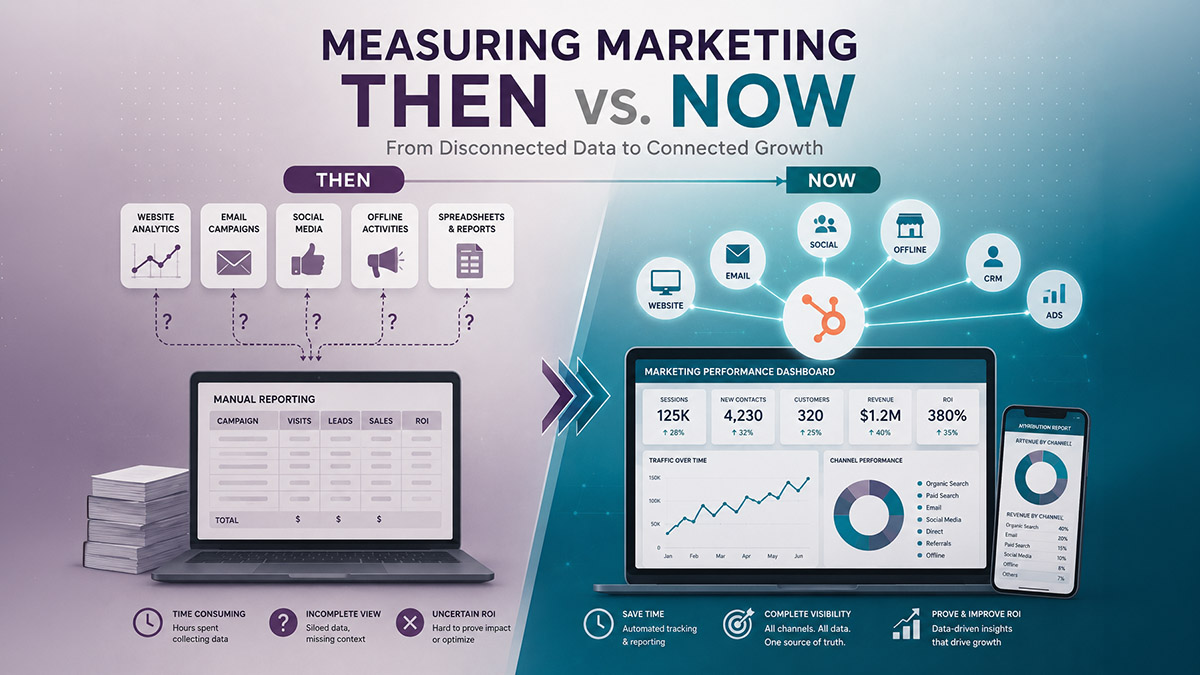
I’m not saying that to be dramatic. I’m saying it because I lived it. I watched the entire evolution happen in real time — from hit counters and server logs to spreadsheets cobbled together from three different platforms, to what HubSpot has built: a single system where every contact, campaign, email, deal, and dollar of revenue lives in one connected place.
If you’re still measuring marketing the old way — or if you’ve invested in HubSpot but haven’t unlocked its reporting — this post is for you.
The Old Way: Measuring in the Dark
When I wrote that original post in 2007, Google Analytics had just launched two years earlier. Before that, if you wanted to know how your website was performing, you were digging into server logs or paying for tools like Urchin or Omniture that most small businesses couldn’t afford.
The free version of Google Analytics changed everything — or so we thought. Suddenly, anyone could see traffic data. Page views. Bounce rates. Time on site.
But here’s what we couldn’t see:
- Who those visitors actually were
- Whether they ever became leads
- Whether those leads ever became customers
- Which marketing activity drove which revenue
So the process looked something like this: run a campaign, watch traffic go up (hopefully), count form submissions manually, hand a spreadsheet to sales, and then… lose the thread completely. Attribution was basically a best guess. “I think the email campaign drove those leads.” “Pretty sure that trade show was worth it.” Pretty sure.
Marketers spent enormous energy tracking things that didn’t connect to revenue, and almost no time on the things that did — because there was no system to connect them.
The data existed. It was just scattered across five different platforms that didn’t talk to each other.
What Changed (And When)
Here’s a quick look at how we got from there to here:
1995–2004: The Hit Counter Era : Oh those were the days! Every single thing that loaded with the webpage was a “hit.” The first web analytics tool, Analog, launched in 1995 and analyzed server logs to show which pages people visited. “Page Views” was the only north star metric anyone had. Hit counters — those little visitor number widgets you’d see on websites — were the status symbol of the early web.
2005: Google Analytics Arrives: Google acquired Urchin Software in April 2005 and launched Google Analytics that November. Free, accessible, and genuinely revolutionary for its time. But it only showed you anonymous traffic — no contact data, no CRM connection, no revenue attribution. Still kicking myself for not buying into Google stock back then.
2006–2012: The Disconnected Stack Era: Businesses started piling on tools. Analytics for traffic. Email platforms for outreach. CRMs for sales. Social media schedulers. Each platform collected its own data, in its own format, with no way to create a unified view. Marketing and sales operated in different systems and often in different realities.
2006: HubSpot Founded: HubSpot launched with a simple but radical idea: what if all of it lived in one place? Marketing, CRM, sales, service — one platform, one contact record, one source of truth. And I was still struggling with an ACT database . .. what cloud?
Today: Connected Data, Real Attribution
According to HubSpot’s 2026 State of Marketing Report, 86.4% of marketers now use AI tools. Half of all consumers use AI-powered search. The pressure to prove ROI has never been higher — and the tools to actually do it have never been better.
The HubSpot Way: Measuring What Actually Matters
The biggest shift HubSpot created isn’t a specific report or dashboard feature. It’s the philosophy underneath the platform: every touchpoint, from the first anonymous website visit to a closed deal, lives in a single connected system.
Here’s what that makes possible.
You Know Who’s On Your Site
Not just “200 people visited this page.” HubSpot’s tracking code identifies known contacts the moment they land on your site — so when a lead you’ve been nurturing for three months finally visits your pricing page, you know. Your sales team can follow up in the moment that matters.
Every Email Connects to a Contact Record
In the old world, email marketing data lived in your email platform. Your contacts lived in your CRM. The two databases rarely matched, and attribution was a manual nightmare. In HubSpot, every email open, click, and reply is logged directly on the contact’s record. You can see the full conversation history, the content they’ve engaged with, and where they are in the lifecycle — without toggling between platforms.
Revenue Attribution Is Actually Possible
This is the big one. HubSpot’s multi-touch attribution reporting lets you see which marketing activities influenced a deal — first touch, last touch, and every interaction in between. Instead of “I think the blog post helped,” you can see that a specific piece of content was touched by 14 contacts before they closed, across an average deal value of $8,000.
That’s not guessing. That’s data.
Dashboards Built for Decisions, Not Just Reporting
The old approach to marketing reporting: pull data from multiple sources, build a slide deck, present it to leadership, watch them question the numbers because they came from three different places. The new approach: a custom HubSpot dashboard that pulls live data across contacts, deals, campaigns, and revenue — all in one view, always current, no manual assembly required.
Businesses using HubSpot report a 505% ROI over three years and launch marketing campaigns 68% faster on average. That’s not a coincidence — it’s what happens when your measurement system is built into your execution system.
The Numbers That Tell the Story
If you want to understand just how dramatically measurement has evolved — and why the stakes are so high right now — here’s the data:
- 35% of marketers now use data to inform marketing strategies (HubSpot State of Marketing 2025) — up from a fraction of that when I wrote the original version of this post
- 31% started using data specifically to demonstrate ROI — because leadership is finally asking for proof
- Website, blog, and SEO remains the #1 ROI-generating channel for B2B brands, according to HubSpot’s 2025 State of Marketing Report — which means the content you publish needs to be trackable and connected to outcomes
- 96% of marketers say personalized experiences increase sales (HubSpot) — and personalization at scale is only possible when your data is unified
- HubSpot users see 129% more inbound leads and 50% more deals closed on average — outcomes that are only measurable when your CRM and marketing are in the same system
The data analytics market is expected to be worth $550 billion before the end of this decade. The businesses that win won’t necessarily be the ones with the most data. They’ll be the ones with the most connected data.
What This Means If You’re Using HubSpot Right Now
If you’ve invested in HubSpot but you’re still measuring your marketing the old way — pulling reports manually, working out of disconnected spreadsheets, guessing at attribution — you’re leaving the most valuable part of the platform on the table.
The setup matters. A lot.
HubSpot doesn’t hand you attribution reporting and a connected data model out of the box. Your lifecycle stages have to be defined. Your contact properties have to be mapped. Your campaigns have to be tagged. Your pipelines have to be configured to reflect how your business actually sells — not how HubSpot defaults to selling.
When that foundation is in place, the reporting becomes genuinely powerful. When it’s not, you get data that looks good in a dashboard and means very little in practice.
This is exactly the work I do for clients — building the HubSpot infrastructure that makes measurement actually work, not just technically, but strategically.
Internal Links for Further Reading
I’ve been working in digital marketing since 1997 — before Google, before analytics platforms, before any of the tools we take for granted today existed. If you want a HubSpot setup that actually gives you the measurement you’re paying for, let’s talk.
What is the difference between old-school web analytics and HubSpot reporting?
Traditional web analytics tools like Google Analytics show anonymous traffic data — page views, sessions, and bounce rates. HubSpot connects that traffic data to individual contact records, deal pipelines, and revenue outcomes. The difference is the difference between knowing that 200 people visited your pricing page and knowing that 14 of them were existing leads who closed within 30 days.
Can HubSpot really replace Google Analytics?
For many B2B businesses, HubSpot’s built-in traffic and campaign reporting is sufficient for day-to-day decision-making. Google Analytics still has advantages for deep behavior analysis and e-commerce tracking. Most HubSpot users run both, but HubSpot is the primary source of truth for anything contact- or revenue-related.
What is multi-touch attribution in HubSpot?
Multi-touch attribution is HubSpot’s way of crediting all the marketing interactions that influenced a deal — not just the first or last touchpoint. Instead of giving 100% of the credit to the ad that a prospect clicked right before they bought, multi-touch attribution shows every blog post, email, and landing page that played a role in the decision. It gives you a much more accurate picture of what your marketing is actually doing.
How do I know if my HubSpot reporting is set up correctly?
A few red flags: your contact counts don’t match between your CRM and your email tool, your lifecycle stages aren’t moving automatically, your campaign attribution reports show “unknown source” for a significant chunk of your leads, or your sales team is manually logging activity instead of having it captured automatically. If any of these are true, your reporting foundation needs attention.
What HubSpot reports should every B2B marketer be using?
At minimum: a contact lifecycle funnel report, a deal pipeline by source report, an email performance report tied to contact properties (not just open rates in isolation), and a campaign attribution report if you’re running multi-channel campaigns. Custom dashboards should be built around the questions leadership actually asks — not the default reports HubSpot generates out of the box.
Do I need a HubSpot consultant to set up reporting?
Not always — but it depends on your setup complexity. If you’re running a single hub with simple lead tracking, you can get reasonably far with HubSpot’s documentation. If you’re running multi-hub implementations, have custom objects, or need to connect HubSpot data to third-party tools for attribution, a consultant will save you significantly more time than the engagement costs.