
“No Way to Qualify Your Visitors” — I Wrote That in 2007. Here’s What’s Different Now.
Back in February 2007, I published a post called “Revolutionize Your Internet Prospecting with Personalization and Targeted Messaging.”
The opening line: “There is no way to qualify your visitors… or is there?”
I was asking a genuine question. The challenge at the time was real. When someone walks into your office, you can ask them questions. You can read the room. You figure out pretty quickly whether they’re ready to buy or just looking around. On a website? You’re guessing.
I still think the instinct behind that post was right. Not every visitor wants the same thing. A real estate website has three completely different audiences landing on the same homepage — buyers, sellers, and people looking for an agent. Showing them all the same experience is a bet that most of them will figure it out on their own.
Most won’t.
What I didn’t have in 2007 was the toolset to do anything about it. So the advice mostly came down to writing better copy and using clear calls to action to help visitors self-select. Not wrong. Just limited.
What Actually Changed
HubSpot.
More specifically: what HubSpot makes possible when it’s actually connected to your website and doing its job.
The “no way to qualify your visitors” problem I described in 2007 is largely solved — not perfectly, not for every anonymous visitor, but for the contacts you’ve already built a relationship with. Here’s what that looks like now.
The tracking code knows who’s there.
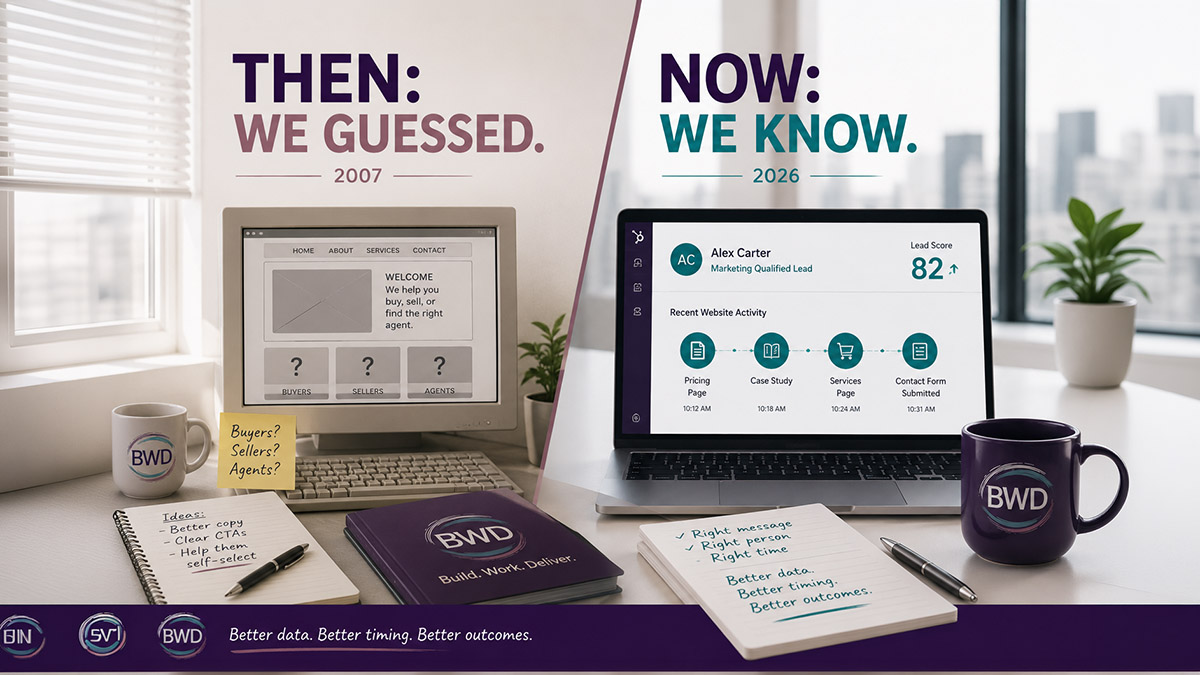
When a known contact visits your site — someone who clicked a link in a HubSpot email, filled out a form, or was previously cookied in your portal — HubSpot recognizes them. It logs every page they visit and connects that activity to their contact record. You’re not flying blind anymore. You can see what they looked at, when they came back, and what that pattern tells you about where they are in their decision. If your website and HubSpot aren’t talking to each other yet, that’s the first thing to fix.
Lead scoring turns behavior into qualification signals.
The phrase “qualify your visitors” is exactly what lead scoring does in HubSpot. Page views, return visits, form fills, email clicks — all of it adds up to a score that tells you whether you’re looking at a browser or a buyer. This is automatic. It doesn’t require someone to manually review every contact. It runs in the background and surfaces the contacts worth paying attention to.
Smart content and smart CTAs personalize the experience.
This is the closest thing to what I was describing in that 2007 post — showing different content to different visitors based on what you know about them. A first-time visitor sees a generic intro. A returning contact who’s already engaged with three pieces of your content sees something different. HubSpot’s smart content tools let you configure that without rebuilding your whole website.
Real-time visit alerts tell you when a lead comes back.
One of the things I wrote in 2007 was about giving visitors clear paths so they don’t have to find their own way. HubSpot takes that further — it can alert you the moment a known contact revisits your site, which gives you a reason to reach out while they’re actively engaged. That’s the digital equivalent of knowing someone just walked back through your door.
Segmentation lets you go deeper.
The “not every visitor needs everything you have to offer” point from 2007 gets practical with HubSpot’s segmentation tools. Grouping contacts by behavior, lifecycle stage, industry, or engagement level means your messaging can actually match where they are — instead of sending the same thing to everyone and hoping it lands.
What Still Holds Up
The part of that 2007 post that aged best was the most basic part: don’t assume your visitors will figure it out.
That’s still true. And it’s still the thing most B2B websites get wrong. Good tools don’t fix a website that doesn’t have a clear path for its visitors. HubSpot makes the personalization possible, but someone has to think through who lands on the page, what they need, and where they should go next.
That part hasn’t been automated away.
What has changed is that once you’ve built that foundation, spotting buyers before they raise their hand is genuinely possible now. You don’t have to wait for someone to fill out a form to know they’re interested. The behavior tells you.
In 2007, I ended that post by saying the key to internet prospecting is being adaptable and willing to try new things.
Still true. What’s new is that the tools have caught up to the instinct.
Teajai Kimsey is a HubSpot Solutions Partner and Upwork Top Rated Plus consultant serving small and mid-size B2B companies. She works directly with clients — no handoffs, no junior staff. View the HubSpot Work Portfolio, contact Teajai.
When a known contact visits your site HubSpot recognizes them.
FAQ: Qualifying Website Visitors with HubSpot
Can HubSpot identify who is visiting my website?
HubSpot can identify known contacts — people who have previously filled out a form, clicked a HubSpot email link, or been cookied in your portal. Anonymous visitors show up in aggregate analytics, but you won’t have a name or contact record until they take an action.
What is HubSpot smart content?
Smart content lets you show different versions of a page section, CTA, or form based on what HubSpot knows about the visitor — their lifecycle stage, list membership, or contact properties. A returning lead can see different messaging than a brand-new visitor on the same page.
What is lead scoring in HubSpot and how does it work?
Lead scoring assigns point values to contacts based on their properties and behavior — pages visited, emails opened, forms submitted, and more. Contacts accumulate a score over time, which helps you identify who’s genuinely interested versus who just landed on your homepage once.
How do I get notified when a contact visits my website?
HubSpot’s contact activity feed shows website visits for known contacts. You can also use workflows to trigger internal notifications when a high-priority contact or high-scoring lead visits specific pages.
Do I need the HubSpot CMS to use smart content?
Smart content modules work natively within HubSpot Content Hub (formerly CMS Hub). Some functionality is available on external sites through HubSpot’s tracking code, but the full personalization experience is designed for pages hosted on HubSpot.
Get in Touch