

Why Your Emails Are Going to Spam (And How to Actually Fix It)
I’ve had the same conversation at least four times in the last two weeks.
Different companies. Different industries. Different HubSpot setups. Same panic: emails going to spam, clients not getting booking confirmations, sequences landing nowhere, and a sales team wondering what broke.
And increasingly, I’m seeing the same proposed “fix” floating around — add another sending service, spin up fresh mailboxes, diversify your SMTP infrastructure. One promoted LinkedIn post from a well-known cold outreach platform literally recommended adding a third email sending layer because Gmail and Outlook are “cracking down.”
That’s not a fix. That’s a confession.
If you’re adding infrastructure to get around inbox providers’ filters, you’re telling on yourself. The providers know what you’re doing. And they’re getting better at stopping it.
Here’s what’s actually happening, what’s unique about the HubSpot setup, and what you actually need to do about it.
The Grace Period Ended
For years, inbox providers asked nicely. SPF, DKIM, and DMARC existed, they were recommended, but enforcement was loose. Emails with broken or missing authentication still usually arrived — maybe a little slower, maybe occasionally flagged — but they got there.
That era is over.
Starting in early 2024 and ratcheting up hard through 2025, Google, Yahoo, and Microsoft all moved from “we’d prefer you authenticate” to “no authentication, no inbox.” Here’s the timeline:
Google and Yahoo kicked off enforcement in February 2024
Microsoft followed with full enforcement in May 2025 — the last major provider to drop the hammer, which is why the inbox panic really started spreading mid-year
Microsoft’s enforcement in particular hit companies hard because so many B2B organizations run on Outlook and Microsoft 365. If you’re sending to business contacts, you’re sending to Microsoft inboxes. And Microsoft now returns a hard 550 5.7.515 rejection for non-compliant bulk senders — the email doesn’t bounce-and-sit, it gets refused before it ever reaches the recipient.
Your contacts never see it. You never get a bounce notification. You just stop hearing back.
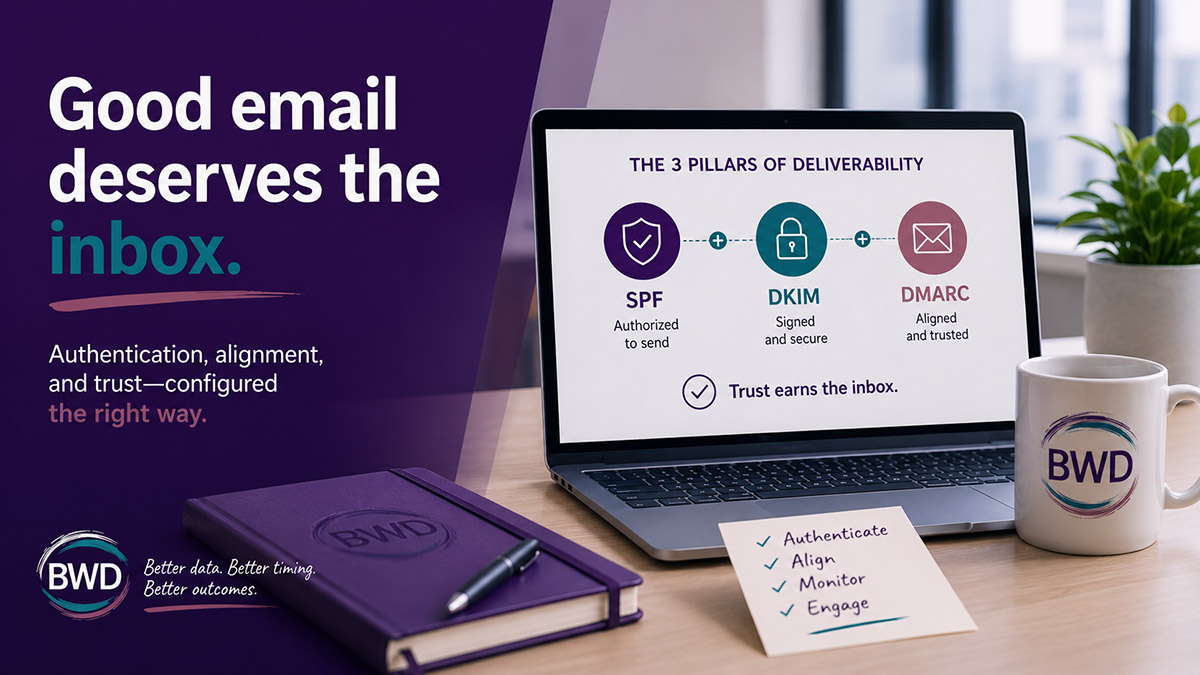
The Three Things That Now Have to Work Together
Think of it this way. Your email is like a package delivery. Used to be, you could slap a label on it and the post office would mostly deliver it. Now there’s a three-part ID check at the door.
SPF — “Is this sender authorized to deliver on behalf of this address?” It’s a list in your DNS that says which mail services are allowed to send email from your domain. If HubSpot is sending your emails and your domain doesn’t list HubSpot as an approved sender, the receiving server treats it like an unauthorized delivery truck.
DKIM — “Was this package tampered with?” It’s a digital signature that proves the email wasn’t altered between when it left your sending platform and when it arrived in someone’s inbox.
DMARC — “Do all the pieces match the address on the box?” DMARC checks that the visible “From” domain actually aligns with the authenticated sender. Having SPF and DKIM isn’t enough if they’re pointing to different domains. Alignment is what ties them together.
All three have to be in place. And they have to be consistent with each other.
HubSpot Has Two Different Email Roads — and That’s Where Most People Get Confused
This is the part almost nobody explains clearly, and it’s why people who “set up HubSpot email” months ago are now getting spam complaints they don’t understand.
Marketing emails — newsletters, campaigns, automations — go through HubSpot’s sending network. HubSpot manages the infrastructure, and you authenticate by connecting your sending domain in HubSpot and adding the DKIM records to your DNS.
Sequences and connected inbox sends — the one-to-one emails from the contact record, meeting booking confirmations, sales follow-ups — those travel a completely different road. HubSpot doesn’t send them. HubSpot submits them to your connected mailbox, and your mail provider (Microsoft 365, Google Workspace) actually sends them from their servers.
This matters enormously.
A company can have HubSpot marketing email configured perfectly and still have their booking confirmations going to spam — because those two paths are separate and require separate authentication steps.
If you set up your sending domain in HubSpot and checked that box, you fixed the marketing email road. The sequence email road runs through your Microsoft 365 tenant and has completely different authentication requirements.
I diagnosed exactly this problem for a cloud communications company recently. Their booking confirmation emails — not marketing blasts, just the automated “your meeting is confirmed” messages from HubSpot — were landing in spam at an alarming rate, particularly with enterprise clients running Microsoft 365 and tightened security policies. The HubSpot side looked fine. The problem was how their Microsoft 365 environment was configured, and what was actually signing those outgoing messages.
Related: Sequences vs. Marketing Emails in HubSpot — if you’re not clear on which send path your emails use, start here.
The Microsoft 365 + HubSpot Sequences Problem Is Its Own Category
If your team uses HubSpot sequences and connects them through a Microsoft 365 mailbox, you’ve got a specific issue to know about.
Microsoft’s anomaly detection watches your mailbox for sudden changes in sending behavior. A sales rep manually sends 20 emails a day — normal. That same rep enrolls 150 contacts in a HubSpot sequence and the system starts sending in a burst pattern — flagged.
Microsoft’s AI interprets that pattern as a compromised account, not a sales rep. The mailbox gets restricted. Remaining sequence steps go unsent. You get an NDR (Non-Delivery Report) error 5.1.8: “you weren’t recognized as a valid sender.”
This happens even though HubSpot throttles sequences to three emails per minute, well under Microsoft’s published 30-messages-per-minute limit. The trigger isn’t raw volume. It’s the pattern change.
The fix lives in two places and HubSpot can’t solve it alone because they’re not the sender — Microsoft is:
On the Microsoft side: Your email admin needs to create a custom outbound spam policy in Microsoft Defender scoped to the affected senders. This tells Microsoft’s system that this sending pattern is intentional.
On the HubSpot side: Throttle your enrollments. Start with 25–30 contacts at a time rather than bulk-enrolling hundreds. Let sender reputation build gradually.
If you’re also running a third-party email security gateway — Mimecast, Proofpoint, Barracuda — there’s an additional wrinkle. Those gateways often configure your SPF record to authorize only their servers, not Microsoft’s. When HubSpot submits a sequence email to your Microsoft 365 mailbox and Microsoft sends it from their servers, the receiving end checks your SPF record, doesn’t find Microsoft’s servers listed, and fails the authentication check. Your gateway is bypassed entirely on the outbound path.
That’s a DNS fix, but it requires knowing which problem you actually have before you start editing records.
Related: Smarter Sales Outreach in HubSpot: How Dynamic Sequences Help You Focus on the Right Leads
About That DMARC Record You Set to “None”
Every one of the companies I’ve talked to in the last few weeks had the same DMARC situation: the record existed, but the policy was p=none.
p=none is monitoring mode. It’s a placeholder that says “I know DMARC exists” while telling receiving servers to do absolutely nothing with failures. It has no effect on deliverability. Zero.
Gmail, Outlook, and Yahoo are now checking not just whether you have a DMARC record, but whether it does anything. A p=none policy signals that your email security setup isn’t finished.
The progression you need:
- Make sure DKIM is connected and verified in HubSpot first
- Move DMARC to p=quarantine — failing emails go to spam instead of being treated as legitimate
- Monitor for a week or two that your own emails are still arriving normally
- Move to p=reject — failing emails are refused entirely, which is what the major providers now want to see
Don’t jump straight to p=reject if you haven’t verified that HubSpot’s sending domain is properly connected. If the authentication isn’t wired up and you flip to reject, you can block your own legitimate emails.
Related: Avoiding Email Horror Stories: Deliverability, Frequency & the HubSpot Loop
Why Adding More Email Infrastructure Makes It Worse
Here’s the thing about those promoted posts recommending a third SMTP service, a fourth sending domain, or a network of warmed-up alternative mailboxes.
They’re designed for cold outreach at scale — companies sending thousands of emails to contacts who never opted in, cycling through infrastructure because their current setup gets flagged. The “solution” they propose is to spread the sending across enough addresses and services that no single one accumulates a bad enough reputation to get blocked.
That’s a game of whack-a-mole with inbox providers who have been running that same game for years and are increasingly good at it.
Legitimate sending doesn’t work like that.
The difference isn’t whether you’re doing cold outreach — sequences exist for exactly that purpose. The difference is whether you’re sending well-targeted messages to the right people or blasting volume at anyone who might stick. If you have a clean, researched list and a properly authenticated domain, you don’t need a third sending layer. You need your current setup to be configured correctly.
Clean means verified. A tool like ZeroBounce lets you run your list before you send and flags invalid addresses, role-based emails, and catch-all domains — the contacts that inflate your list size but tank your deliverability metrics when they bounce. Sending to an unverified list through a perfectly authenticated domain still gets you flagged. The infrastructure and the list both have to be in good shape. Authentication gets you in the door. A clean list keeps you there.
One SMTP service. One properly authenticated domain. Done.
The companies panicking right now aren’t panicking because they need more infrastructure. They’re panicking because the paperwork that should have been filed during setup was skipped — and now the deadline has passed.
The Quick Triage Checklist for HubSpot Users
Before anything else, figure out which type of email is the problem. Marketing campaign email or sequence/connected inbox email? They’re separate issues.
Before you send to any list — marketing or sequence:
- Run it through ZeroBounce first. Invalid addresses, role-based emails (info@, admin@, support@), and catch-all domains will bounce or never engage. Bounce rates above 2% signal to inbox providers that your list hygiene is poor, which damages sender reputation regardless of how clean your authentication is.
For marketing email authentication (HubSpot’s sending network):
- In HubSpot: Settings → Content → Domains & URLs → Email Sending tab
- Look for “Authenticated” status in green\
- If it says “Not authenticated” or “Partially authenticated” — that’s the starting point
- Run your domain through MXToolbox and check your DMARC policy: p=none needs to become p=quarantine, then p=reject
For sequence / connected inbox email (your mail provider’s network):
- Check whether DKIM is enabled at the Microsoft 365 or Google Workspace level\
- If you have a third-party gateway (Mimecast, Proofpoint, Barracuda): confirm your SPF record includes Microsoft’s servers, not just the gateway’s
- Check Microsoft Defender for any restricted user accounts
- Throttle sequence enrollment to 25–30 contacts at a time until reputation is established. Check your send frequency in HubSpot to make this account wide.
The thing nobody checks but should: If your HubSpot account was migrated from another company’s portal, verify what domain is anchored in Account & Billing → Company Info. A legacy domain still embedded there can cause authentication mismatches that no amount of DNS record tweaking will fix — because HubSpot is signing emails with the wrong domain key at the account level.
Related: The Most Overlooked HubSpot Settings That Could Be Costing You Revenue
This Is Not Going to Relax
The enforcement direction is one-way. Google, Yahoo, and Microsoft aren’t going to roll back these requirements. They will continue tightening. Enterprise companies running Proofpoint and Mimecast will continue layering their own security policies on top of the provider-level requirements.
And the workaround economy — additional SMTP services, alternative sending infrastructure, burner domains — is going to keep running into walls that are deliberately being raised faster than the workarounds can keep up.
The companies that get ahead of this treat authentication as infrastructure, not an afterthought. SPF, DKIM, and DMARC set up correctly, aligned with each other, with DMARC at p=reject. One properly authenticated sending domain in HubSpot. Microsoft 365 policies configured for intentional sequence sends.
That’s not complicated. But it does require someone who knows where to look.
Teajai Kimsey has been in email marketing since 2005 — back when the Wichita Eagle ran a feature on her work called “Direct Mail Goes Online.” Today she’s a HubSpot Solutions Partner and Upwork Top Rated Plus consultant serving small and mid-size B2B companies. She works directly with clients — no handoffs, no junior staff. View the HubSpot Work Portfolio, contact Teajai.
If you have a clean, researched list and a properly authenticated domain, you don’t need a third sending layer.
FAQ: HubSpot Email Going to Spam
Why are my HubSpot emails going to spam even though I set up authentication?
Authentication has two components: having the records and having them correctly aligned. A DMARC record set to p=none does nothing. A DKIM record that exists in your DNS but was never verified in HubSpot doesn’t protect your email. And if your marketing email authentication is correct but your sequences send through Microsoft 365, those are separate systems that each need their own configuration.
Do HubSpot marketing emails and sequence emails use the same authentication?
No. Marketing emails go through HubSpot’s sending network and use the sending domain you connect in HubSpot. Sequence emails, meeting confirmations, and one-to-one emails from the contact record go through your connected mailbox — Microsoft 365 or Google Workspace — and use that provider’s authentication. They’re separate and both need to be configured correctly.
Why is Microsoft blocking my HubSpot sequences?
Microsoft’s anomaly detection flags sudden changes in sending patterns, even at low volume. A sales rep who normally sends individual emails and then bulk-enrolls contacts in a sequence looks like a compromised account to Microsoft’s AI. The fix involves a custom outbound spam policy in Microsoft Defender and throttling sequence enrollments to lower volumes while sender reputation builds.
What does DMARC p=none actually mean?
p=none puts your DMARC in monitoring mode, which means receiving servers log failures but take no action on them. It has zero effect on whether your emails arrive in inboxes. You need p=quarantine (failures go to spam) or p=reject (failures are refused) for the policy to do anything meaningful.
Is adding a third-party SMTP service the right fix for deliverability problems?
No. Third-party SMTP services like additional sending layers are designed for high-volume cold outreach operations that cycle through infrastructure to avoid reputation damage. For companies sending to opted-in contacts through HubSpot, the correct fix is proper authentication on your existing domain — not additional infrastructure. Adding more sending services adds more variables without addressing the root cause.
What's the difference between SPF, DKIM, and DMARC?
SPF authorizes which servers can send email on behalf of your domain. DKIM adds a digital signature proving the email wasn’t tampered with in transit. DMARC ties them together and tells inbox providers what to do when authentication fails. All three need to be in place and consistent with each other — and in HubSpot’s case, they need to be verified in your portal settings, not just present in your DNS.
Get in Touch