

Website Lead Generation Then and Now
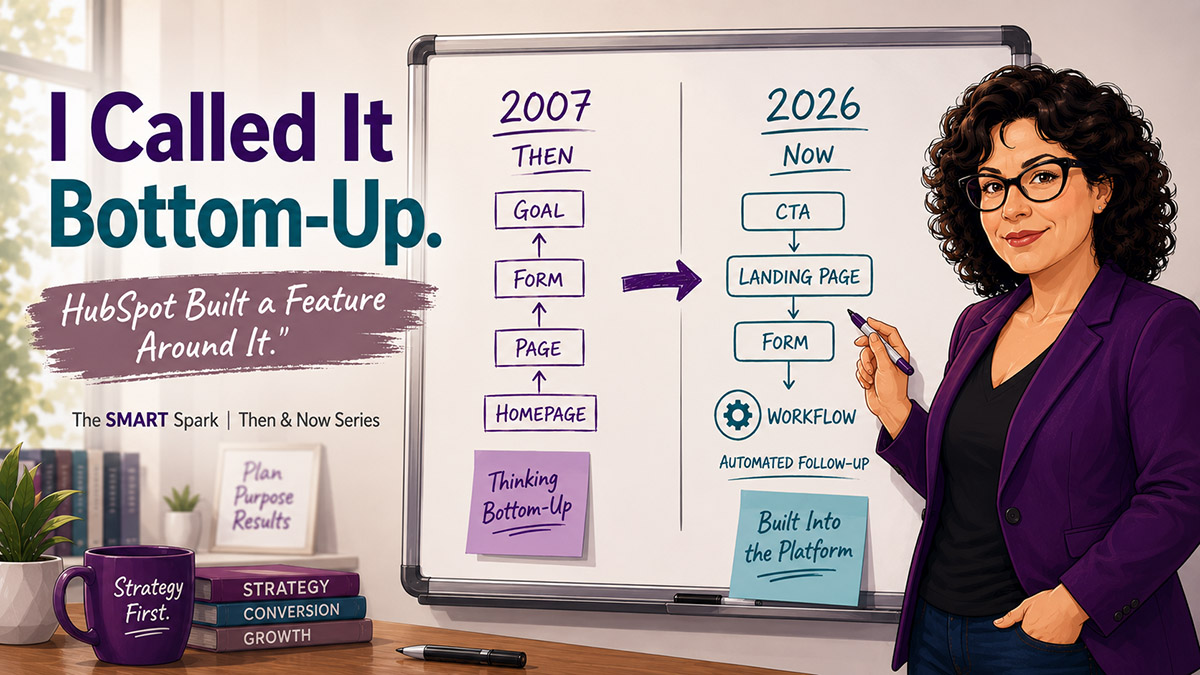
I Called It Bottom-Up. HubSpot Built a Feature Around It.
I pulled this post from the archives. April 2007.
It was titled something like “Reverse Engineering Your Website.” The core idea: stop building your website from the top down. Design isn’t the first step. Your goal is.
I called it thinking bottom-up.
Almost 20 years later, I still say this. Usually within the first 15 minutes of a new client conversation.
Then: What I Said in 2007
The problem I was describing wasn’t really a design problem. It was a planning problem.
Most companies hired someone to build a website that looked good. Then — after it was live — they wondered why it wasn’t generating leads. Design came first. Goals came later. Or never.
My advice was to flip the whole thing. Start with a meeting. Sales, marketing, whoever owns revenue. Answer one question first: What should this website actually do?
Generate leads? Drive direct sales? Collect customer feedback? Each answer changes what gets built and where.
For B2B companies focused on lead generation, which was most of my clients, the framework was simple. Decide how many leads you want. Find the page where those leads should originate. Then work backward to the home page.
And here’s the part that always got pushback: don’t just put the contact form on the contact page.
If you’re selling property management services, the form belongs on the property management page. Put it where the visitor makes their decision — not three clicks downstream from where they understood what you do. The message on that page matters as much as the form itself. Focus on benefits. Assure them of their privacy. Give them a clear reason to act.
That was the argument in 2007. Think about the conversion first. Build everything else in service of that moment.
Now: HubSpot Built a Feature Around This
Here’s the part that still makes me smile. HubSpot created something called a Conversion Path.
A Conversion Path is the connected sequence: a CTA → a landing page → a form → a thank-you page. All linked. All designed to move a specific visitor toward a specific action. It’s a named concept with a feature set behind it.
That’s exactly what I was asking companies to do manually in 2007.
The difference is that the architecture now exists in the platform. You’re not doing this on a whiteboard anymore. HubSpot expects it.
In practice, a well-built conversion path looks like:
A CTA embedded directly in your service page content — not tucked into the navigation or buried at the bottom of the page. A HubSpot landing page or embedded form that captures the lead without making the visitor go find the contact page. A thank-you page that actually continues the conversation instead of just saying “we’ll be in touch” — and yes, there’s a whole strategy to that. And a workflow that fires the moment the form submits, so follow-up happens immediately, not when someone remembers to check the inbox.
If you want to understand how your website and HubSpot should be connected at the architecture level, I wrote more about that here: Your Website Called. It Wants to Talk to HubSpot.
What’s Different Now
In 2007, you built the path and hoped people followed it. Tracking was limited. Maybe you had a hit counter. Maybe a basic analytics install that told you how many people landed on the homepage.
That was the ceiling.
Now you can see every step. Which CTAs are getting clicks. Which forms are getting completions. Where people are dropping out of the path before they convert. HubSpot’s analytics don’t just tell you what happened — they tell you where the path broke.
You can also know when a lead comes back. If someone fills out a form but isn’t ready to buy, and then returns to your site three weeks later, HubSpot can tell you that in real time.
That wasn’t possible in 2007. You just waited and hoped they called.
Progressive profiling changed the form strategy completely. Instead of asking for everything on the first visit — name, company, title, phone, budget, timeline — you ask for a little at a time. Each time that visitor fills out a form, HubSpot shows different fields. By the third interaction, you actually know who you’re talking to without overwhelming them on visit one.
And form follow-up isn’t manual anymore. The right person gets notified automatically. Leads don’t sit in an inbox waiting for someone to respond. The workflow handles it.
What Hasn’t Changed: The strategy.
Start with what you want to happen. Work backward to the page that has to exist before that. Keep building backward until you reach the entry point.
The form doesn’t do the work. The page earns the form.
Benefits over features on the conversion page. Privacy assurance. A clear, specific reason to act. None of that has changed.
The mistake hasn’t changed either.
I still walk into HubSpot portals where someone built a beautiful website, added HubSpot afterward, dropped a single form on the contact page, and is wondering why leads aren’t coming in. The website and the CRM were designed in separate conversations. That gap shows up in the results.
You Bought a System. What You Needed Was a Plan. — I wrote that post because it’s still the most common situation I walk into. HubSpot is live. The strategy isn’t.
If your website is getting traffic but not converting it, the answer is usually structure, not offer. Here’s how I think through that.
The Bottom Line
In 2007, I was asking companies to think differently. Put the goal first. Design the path before you design the pages.
HubSpot made that thinking into a product.
But the product doesn’t decide your goals. The platform doesn’t know where in the buyer journey the form should live, or how many pages of education a visitor needs before they’re ready to act. It doesn’t tell you which service pages should have embedded forms versus which should drive to a standalone landing page.
That’s still strategy. And strategy still comes first.
If you have a HubSpot portal that’s already live and you’re not sure whether the conversion architecture is set up right, that’s exactly the kind of audit I do. I’d be glad to take a look.
Teajai Kimsey is a HubSpot Solutions Partner and Upwork Top Rated Plus consultant serving small and mid-size B2B companies. She works directly with clients — no handoffs, no junior staff. View the HubSpot Work Portfolio, contact Teajai.
Start with what you want to happen and work backward.
What is a conversion path in HubSpot?
A conversion path in HubSpot is the connected sequence of a CTA, a landing page, a form, and a thank-you page — all designed to move a specific website visitor toward a specific action, like submitting a lead generation form. It’s the platform’s built-in framework for what good lead capture architecture looks like.
Where should I put a contact form on my B2B website?
On the page where the visitor makes their decision — typically the relevant service or product page, not just the contact page. Contextual form placement (matching the form to the content the visitor is already reading) significantly increases conversion rates compared to a single generic contact page.
What's the difference between a landing page and a contact page for lead generation?
A landing page is built for one specific goal with a targeted message, a single CTA, and a form matched to that offer. A contact page is a general-purpose page. For B2B lead generation, landing pages consistently outperform contact pages because they match the visitor’s intent at a specific moment in their decision process.
How do I build a B2B website for lead generation in 2026?
Start with the goal — what action do you want the visitor to take, and how many leads do you need? Work backward: identify the conversion page, then the pages that lead to it, then the entry point. In HubSpot terms, this means building conversion paths (CTA → landing page → form → thank-you page) for each core service, embedding forms on relevant service pages, and connecting form submissions to automated follow-up workflows in HubSpot.
How does HubSpot support website lead generation?
HubSpot provides CTAs, landing pages, embedded forms with progressive profiling, thank-you pages, and automated workflows — all connected to the CRM. When a visitor converts, that data flows directly into HubSpot, triggers follow-up, and creates a contact record. It also provides analytics to see where visitors drop off in the conversion process so you can identify which part of the path needs work.